After 12th & ITI
Start a drafting career with AutoCAD and 3D modelling fundamentals.


Master industry CAD, BIM and analysis software on real drawings and models — the design skills civil and mechanical employers expect.
Program snapshot
Civil/Mechanical · All Levels
Same trainers and live projects on every track. Pick the length that fits your semester or career plan — a counsellor shares fees and scholarships.
3months
Core skills and guided projects for students on a short timeline or professionals upskilling.
6months
University-approved industrial training with a live project, training report and internship letter.
9months
Everything in the 6-month track plus advanced modules and an internship on real client work.
This industrial training covers the software used on real sites and shop floors: AutoCAD for drafting, Revit for BIM, STAAD.Pro for structural analysis, and SolidWorks, CATIA and Fusion 360 for 3D product design, with ANSYS for simulation basics. Every module is practical and drawing-driven.
Projects mirror North India's industries — Jalandhar's hand-tools and sports-goods manufacturers, Ludhiana's cycle and auto-parts units, and Punjab's growing construction and real-estate sector. Longer tracks include an internship on live drawings, with a report and letter for your university.
Included on every track.
Who can join: Civil or mechanical B.Tech, diploma or ITI students, graduates and working engineers.
3 phases, each ending in work you can show. Tap a phase or use the arrow keys to explore.
Phase 1 of 3
Build strong 2D drafting skills with industry drawing conventions.
By the end: You can produce clean, dimensioned drawings to industry standards.
Phase 2 of 3
Model buildings in BIM or mechanical parts and assemblies in 3D.
By the end: You can model a building or a product assembly and detail it.
Phase 3 of 3
Analyse structures and components and deliver project-ready outputs.
By the end: You can analyse, validate and present a complete design project.
CAD and BIM skills turn a civil or mechanical degree into job-ready capability, opening design, drafting and analysis roles in construction firms, consultancies and manufacturing units across Punjab and beyond.
Civil or mechanical B.Tech, diploma or ITI students, graduates and working engineers.
Start a drafting career with AutoCAD and 3D modelling fundamentals.
Complete PTU, GNDU or PU industrial training on real engineering drawings.
Site and production engineers adding BIM, CAD and analysis skills.
Prepare plans, 3D models and drawings for your own clients.
Return to core engineering with current software and project practice.
Formalise YouTube-learned CAD skills with standards and mentor reviews.
You install, configure and ship with every one of these in the lab — the stack employers expect on day one.
2D drafting and detailing
BIM building modelling
Structural analysis and design
3D parts and assemblies
Advanced surface and part design
Product design and CAM basics
Finite element simulation basics
Quick 3D concept models
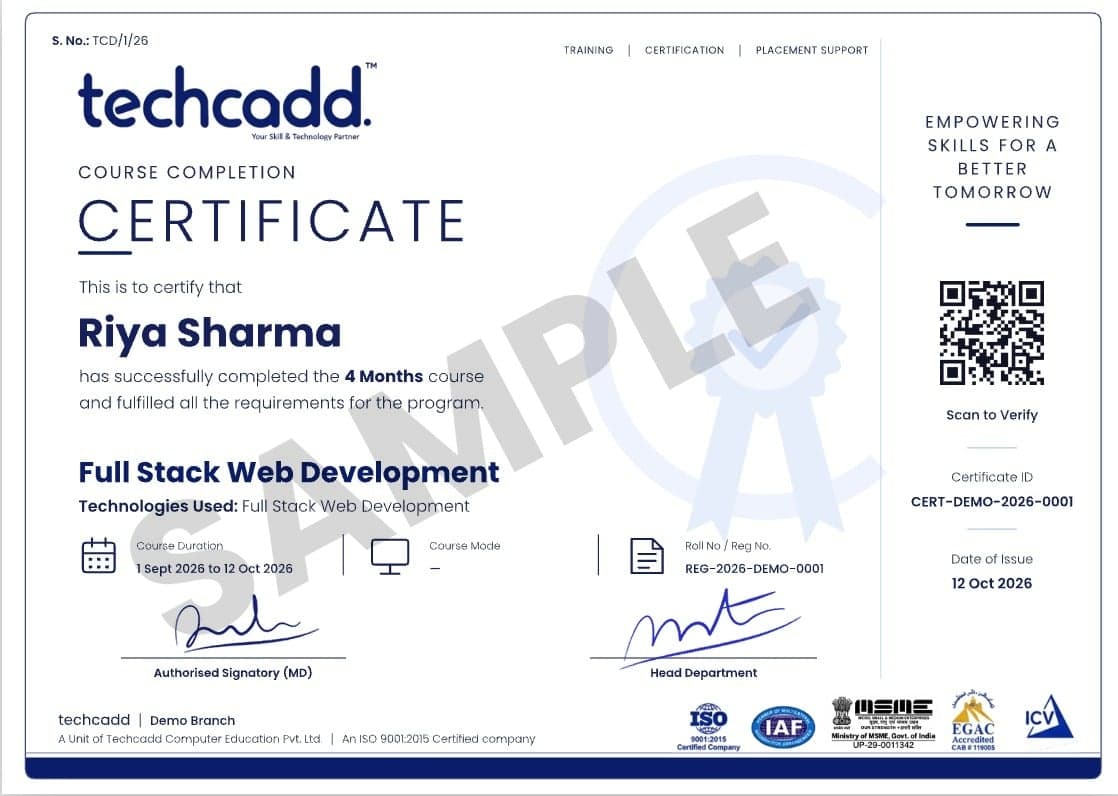
Industry recognised
QR-verifiable certificate with your course, duration, registration number and certificate ID.
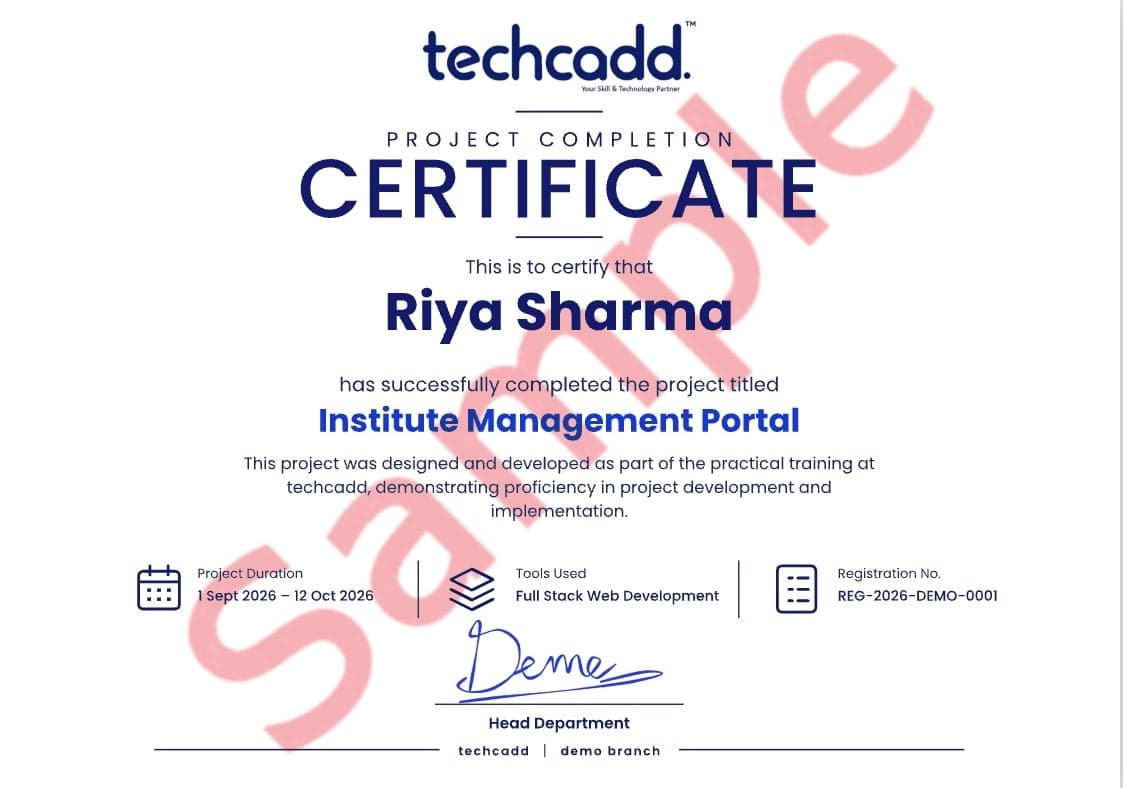
Live project
Names the live project you built, its tools and dates — issued with your internship letter for university training credit.
Every certificate has a unique number that anyone can verify on techcaddjalandhar.com.
Online-verifiable certificate listing your modules, projects and grade.
Experience letter for your live-project internship, accepted for university credit.
Four reviewed projects on GitHub or Behance that you can walk an interviewer through.
Resume and portfolio review, mock interviews and referrals until you are hired.
Straight answers to the career questions students ask us most.
Civil learners move into roles like AutoCAD draftsman, BIM modeller, structural design assistant and site planning engineer. Mechanical learners move into design engineer, CAD engineer, product designer and tool-design roles.
Draftsmen and modellers progress to design engineer, then senior designer or BIM coordinator, and later to design lead or project manager as they take ownership of complete projects.
Yes. House plans, elevation drawings, 3D product models and drawing conversions are in steady demand from builders, contractors and small manufacturers, and many overseas firms outsource drafting work.
Architecture and structural consultancies, builders and real-estate developers across Punjab and Tricity, hand-tools and sports-goods makers in Jalandhar, cycle and auto-parts units in Ludhiana, and remote BIM outsourcing firms.
Civil learners can move into advanced BIM coordination, estimation and project planning tools. Mechanical learners can go deeper into simulation, CAM and CNC programming or product lifecycle tools.
Each project is reviewed by a trainer and published to your portfolio before you move on.
Draft a complete house plan or a dimensioned machine component in AutoCAD, ready for plotting.
Model a Ludhiana-style bicycle frame in SolidWorks, or a G+2 building in Revit, with full detailing.
Work on a real brief: redesign a Jalandhar hand-tool part or prepare a builder's site layout drawings.
Deliver a complete project — a STAAD.Pro-analysed structure or an ANSYS-checked assembly — with drawings and report.
Repeated for every module, so the job feels familiar before you get it.
Every task starts like a real job: a brief, a deadline and a clear definition of done.
You build it yourself in the lab while a mentor reviews your work and unblocks you.
Demo your work and answer questions — practice for interviews and client calls.
Mentors who still ship real projects for clients.
Real briefs, not copy-paste sample projects.
Personal attention and same-day doubt clearing.
Longer tracks include an internship and experience letter.
Resume, mock interviews and referrals to 500+ partners.
Nearly two decades of training students across North India.
What changes when training is built around live work.
| What matters | TechCADD | Typical institute |
|---|---|---|
| Training style | Hands-on labs every class | Mostly theory & slides |
| Projects | Live client briefs & capstone | Sample projects only |
| Batch size | Small batches | Large classrooms |
| Trainer background | Working industry professionals | Full-time trainers only |
| Internship | Included in longer tracks | Rarely offered |
| Placement support | Resume, mock interviews & referrals | Job list on request |
| Doubt clearing | Same day, 1:1 if needed | Weekly, if at all |
| Certification | Verifiable certificate + internship letter | Paper certificate |
4.9750+ Google reviews
Switch modes if your schedule changes — your projects and progress move with you.
Lab-based batches at our North India branches.
Interactive live sessions with recordings for revision.
Saturday–Sunday batches for college students and working people.
Personal mentoring at your pace and schedule.
7 questions
No. We start with AutoCAD basics and engineering drawing conventions. You only need to be comfortable using a computer and have studied, or be studying, civil or mechanical subjects.
Aim for an i5/Ryzen 5 processor, 16 GB RAM and a dedicated graphics card for smooth 3D work. Classroom batches can use our lab systems with the software installed.
Yes. The 6-month industrial training and diploma tracks include a live engineering project, training report and internship letter in the format PTU, GNDU, PU and other universities require.
Follow your branch. Everyone learns AutoCAD first; civil learners then focus on Revit and STAAD.Pro, while mechanical learners focus on SolidWorks, CATIA, Fusion 360 and ANSYS.
No institute can honestly guarantee a job. We provide placement assistance — resume and portfolio reviews, mock interviews and referrals to 500+ hiring partners — and keep supporting you until you are placed.
Book a free counselling session or message us on WhatsApp. A counsellor will share the current fee, EMI options and scholarships for your chosen track.
Yes. Book a free demo using the form on this page or call us. You can attend at any branch or join a live online class.
Sit in a free demo class or talk to a counsellor about your background and goals — no obligation.
Tell us a little about yourself — we'll suggest the right track, share fee and scholarship details and book your free demo.
2nd Floor, Crystal Plaza, SCS 78, Opposite PIMS Hospital, Jalandhar, Punjab 144001Mon – Sat: 9:00 AM – 7:00 PM