Skip to content

AI & Data · Beginner

Data Analytics Course at Techcadd

Learn to collect, clean, analyse and present data using the tools employers actually ask for, such as Excel, SQL, Power BI, Tableau and Python, through real datasets and hands-on projects.

  • 3–4 Months
  • Beginner
  • Classroom + Live Online

Eligibility: Basic computer use; no programming or technical background required

4.9/5 from 750+ Google reviews

Students trained
50,000+
Google rating
4.9/5
Practical learning
80%
Hiring partners
500+
Program Overview

Data Analytics Course at Techcadd

Every business today runs on numbers, and the people who can turn raw data into clear decisions are in high demand. Our data analytics course teaches you to collect, clean, analyse and present data using the tools employers actually ask for, such as Excel, SQL, Power BI, Tableau and Python. You learn through real datasets and hands-on projects instead of theory alone.

The program suits graduates, postgraduates, working professionals, job switchers and freelancers who want a practical entry into one of India's fastest-growing career fields. You can attend live classes online from anywhere, or learn offline at our Jalandhar centre. For learners across Punjab, this means access to industry-focused data training without relocating to a metro. Whether you are starting from scratch or upgrading your current skills, the course takes you from the basics to building dashboards and reports you can show in interviews.

By the end, you will be able to analyse business data, find patterns, create visual reports and present insights confidently.


What You Will Learn & Tools Covered

What You Will Learn in the Data Analytics Course

The curriculum follows the way analysts actually work: get the data, clean it, analyse it, visualise it and explain it. Each module ends with a practical task, so you build a portfolio as you learn.

Modules
7
Topics
21
Get the Full Syllabus PDF on WhatsApp (opens in a new tab)
  1. Module 1Module 1: Data Analytics Foundations
    • What data analytics is, and the difference between descriptive, diagnostic, predictive and prescriptive analytics
    • The analyst's workflow, common job roles and how businesses use data
    • Data types, data sources and how to ask the right business question
  2. Module 2Module 2: Advanced Excel for Analysis
    • Data cleaning, formulas, lookups and conditional logic
    • Pivot tables, pivot charts and dashboards
    • Basic statistics and what-if analysis in Excel
  3. Module 3Module 3: SQL for Data Analysis
    • Writing queries to fetch, filter, sort and group data
    • Joins, subqueries, aggregate functions and window functions
    • Working with relational databases and preparing data for reporting
  4. Module 4Module 4: Statistics for Analysts
    • Mean, median, variance, standard deviation and distributions
    • Correlation, hypothesis testing and sampling
    • Reading numbers correctly so you do not draw wrong conclusions
  5. Module 5Module 5: Python for Data Analytics
    • Python basics, then Pandas and NumPy for data handling
    • Cleaning messy datasets, handling missing values and removing duplicates
    • Exploratory data analysis with Matplotlib and Seaborn
  6. Module 6Module 6: Data Visualisation with Power BI and Tableau
    • Building interactive dashboards and KPI reports
    • Data modelling, DAX basics in Power BI and calculated fields in Tableau
    • Choosing the right chart so your message is clear to managers and clients
  7. Module 7Module 7: Business Case Studies and Capstone Project
    • End-to-end projects on sales, marketing, HR, finance or operations data
    • Presenting insights in plain language, not just charts
    • Portfolio building, resume guidance and interview practice
How You Learn

One simple loop, every single week

Concepts become skills only when you use them. Each week follows the same three steps.

  1. Step 1: Understand

    Short concept sessions with live demos — every idea is shown before it is practised.

  2. Step 2: Build

    Hands-on labs and a project at the end of every module, reviewed by your mentor.

  3. Step 3: Present

    Explain your work in weekly demos — the same way you will in interviews.

Tools & Technologies

Tools and Software Covered

Tools and Software Covered
PurposeTools
SpreadsheetsMicrosoft Excel, Google Sheets
Databases and queryingSQL (MySQL or PostgreSQL)
ProgrammingPython, Pandas, NumPy, Matplotlib, Seaborn
Visualisation and BIPower BI, Tableau
Practice environmentJupyter Notebook
Who Can Do This Course

Who Can Join This Data Analytics Course?

You do not need to be a programmer or a mathematician to start. This data analytics course is built for anyone who is comfortable with basic computer use and curious about numbers. Here is who benefits most:

  • Graduates and postgraduates

    From any stream (BCom, BBA, BSc, BCA, BTech, MBA, MCom) who want a job-ready skill that employers value across industries.

  • Working professionals

    In sales, finance, operations, HR or marketing who want to make decisions from data instead of guesswork, and move into analyst roles.

  • Job switchers

    From non-technical or support roles looking for a structured path into analytics with a clear skill set to show in interviews.

  • Freelancers

    Who want to offer reporting, dashboard and data-cleaning services to clients in India and abroad.

  • Business owners and managers

    Who want to track sales, inventory and customer trends on their own dashboards.

  • Final-year students and 12th-pass learners

    Who want an early start. For them, the course works well after 12th alongside college, as long as they are ready to practise regularly.

What you need: A laptop or desktop, a stable internet connection (for online learners) and willingness to practise on real datasets. Beginners are welcome, because the course starts from the fundamentals.

Check My Eligibility
Learn from Anywhere

Learners from Across States

Our live online classes let you learn from wherever you are. Here is how learners from different states can use this skill:

  • Punjab

    Manufacturing, hosiery, sports goods and export businesses generate heavy sales and inventory data. A data analytics course in Punjab helps local professionals and business owners turn that data into better decisions.

  • Haryana

    With MNCs, logistics and e-commerce in the region, learners in Haryana can aim for analyst roles in supply chain, operations and customer reporting.

  • Himachal Pradesh

    Online data analytics training suits Himachal Pradesh students who want remote jobs or freelancing without moving to a metro, and tourism or hotel professionals who track bookings and seasonal demand.

  • Chandigarh

    The tricity's IT, BPO and startup ecosystem offers entry points for freshers who can show strong Excel, SQL and dashboard skills.

  • Delhi

    As the largest fresher job market, Delhi NCR has agencies, fintech and e-commerce companies that regularly hire analysts, so portfolio projects matter most here.

  • Jammu & Kashmir

    Handicraft sellers, tourism operators and online store owners can use analytics to understand customers and plan pricing, while learners can also work remotely for firms elsewhere.

  • Uttarakhand

    Hospitality, tourism and pharma units in the state need people who can read occupancy, production and sales numbers.

  • Rajasthan

    Jewellery, textile and handicraft businesses can use data to forecast demand, and tourism players can study visitor patterns.

  • Uttar Pradesh

    Retail, electronics and IT hubs create steady demand for MIS and reporting skills, and government-sector aspirants can add a practical data skill to their profile.

Careers

Career and Future Scope

After completing the course, you can apply for roles such as Data Analyst, Business Analyst, MIS Executive, Reporting Analyst, BI Analyst, Marketing Analyst and Operations Analyst. Freelancing is also an option, with services like dashboard building, data cleaning and monthly reporting.

  • Data Analyst
  • Business Analyst
  • MIS Executive
  • Reporting Analyst
  • BI Analyst
  • Marketing Analyst
  • Operations Analyst

Entry-level salaries in India are often around ₹3 to ₹5 lakh per year, and they can rise with experience and strong SQL, Power BI or Python skills. These figures are approximate and vary by city, company and your portfolio. Over time, many analysts move towards senior analyst, analytics manager, data engineering or data science roles.

State-Wise Job Opportunities

  • Punjab

    Manufacturing, hosiery, sports goods and export units need analysts for production, cost and sales reporting. Mohali's growing IT and startup space also hires for reporting roles.

  • Haryana

    Logistics, automobile and e-commerce companies look for analysts who can track deliveries, inventory and customer behaviour. Learners searching for a data analytics course in Haryana often target these operations-heavy roles.

  • Chandigarh

    IT, BPO and education-sector employers in the tricity hire freshers for MIS, reporting and customer analytics work, where strong Excel and SQL skills stand out.

  • Delhi NCR

    Agencies, fintech and media firms hire in large numbers. Marketing and performance analytics roles are especially common for freshers with good dashboards.

  • Uttar Pradesh

    For data analytics jobs in Uttar Pradesh, retail, electronics and IT companies often need reporting and MIS skills, and government-linked projects also use data for planning and monitoring.

  • Rajasthan

    Tourism, jewellery and textile businesses use analytics to forecast demand, plan inventory and understand customer trends, which suits both employees and business owners.

Learners from any state can also apply for remote analyst roles with companies in Bengaluru, Hyderabad, Pune and Mumbai.

Your Mentor

Learn from people who do the work

Every batch is led by a senior mentor and supported by teaching assistants, so doubts are cleared the same day.

Dr. Neha Bansal

Lead Data Science Mentor

Worked on forecasting and analytics for retail and healthcare companies before teaching. Known for explaining statistics and ML with real Punjab business datasets.

  • Machine learning
  • Python & SQL
  • Power BI
  • Statistics
  • Deep learning
Industry experience
11+ years
Students mentored
2,500+
Doubt support
Same day
Why This Program

Why Choose a Data Analytics Course Today?

Data analytics is one of the few skills that is useful in almost every industry. Banks, hospitals, retailers, schools, logistics firms and startups all collect data, and most of them struggle to understand it. That gap is why analyst roles keep appearing in job listings across India, from Bengaluru, Hyderabad, Pune and Mumbai to growing hubs like Gurugram and Noida.

  1. Strong Career Demand

    Companies increasingly expect decisions to be backed by numbers. Roles such as Data Analyst, Business Analyst, MIS Executive, Reporting Analyst, BI Developer and Marketing Analyst are common entry points. Many of these roles are also open to remote work, which is useful if you live outside a metro.

  2. A Realistic Salary Path

    Salaries vary with city, company and skill level. As a rough guide, fresher analyst roles in India often start around ₹3 to ₹5 lakh per year, and professionals with a few years of experience and strong SQL, Power BI or Python skills can move well beyond that. Treat these figures as approximate, since your portfolio and interview performance matter more than any average.

  3. A Low Barrier to Entry

    Unlike some technical fields, you can begin data analytics without a coding background. The learning path moves from Excel to SQL to visualisation tools, and then to Python for those who want to go deeper. Each step produces something you can actually use at work, so the skill pays off even before you finish the course.

  4. Skills That Transfer

    If you work in sales, finance, HR, operations or marketing, analytics makes you better at your current job and opens a path to a promotion or a role change. Freelancers can offer dashboards, data cleaning and reporting as paid services. Business owners can use the same skills to track sales, costs and customer behaviour without depending on someone else.

  5. Why Learn It with Techcadd

    This data analytics course focuses on practice rather than theory. You work on real datasets, build dashboards and prepare reports the way analysts do on the job, so you finish with projects you can discuss in interviews. Live online classes also mean you can learn from anywhere in North India without changing cities.

  6. Who Gets the Most Out of It

    • Learners who want a clear, job-focused skill rather than a general degree add-on
    • Professionals who want to move into analytics without leaving their current job
    • Freelancers and business owners who want to use data to earn or grow more
    • Beginners who prefer a step-by-step path with practice at every stage
  7. Your Next Step

    If you are comparing options, look beyond the course title. Check the tools taught, the number of projects, who trains you and how much hands-on practice you get. A good data analytics course should leave you able to open a messy dataset, clean it, analyse it and explain what it means in plain language.

Why Choose Techcadd

Why Choose Techcadd for Your Data Analytics Course?

Choosing where to learn matters as much as choosing what to learn. At Techcadd, the data analytics course is designed around one question: will you be able to do the job when you finish? Here is what learners can expect.

  1. North India's First AI-Powered and Robotics Learning Centre

    Techcadd positions itself as North India's first AI-powered and Robotics learning centre. For a data analytics learner, this matters in practical ways:

    • Hands-on AI exposure: Analytics today increasingly overlaps with AI. Working in an environment built around AI helps you understand how data feeds into predictions, automation and smarter reporting, rather than seeing analytics in isolation.
    • Practical projects: You learn by working on datasets and building outputs, instead of only watching demonstrations.
    • A modern technology environment: Learning alongside AI and robotics keeps your skills close to where the industry is heading, which helps when you speak to employers about future-ready skills.
    • Value for learners across states: Whether you join from Punjab, Haryana, Himachal Pradesh, Chandigarh, Delhi, Jammu & Kashmir, Uttarakhand, Rajasthan or Uttar Pradesh, you get access to this exposure through live online classes, without moving to a metro.
  2. Practical, Project-Based Training

    Analytics is a skill you build by doing. You clean messy data, write queries, build dashboards and explain your findings. By the end, you have work to show, which matters far more in interviews than a list of topics covered.

  3. Industry-Relevant Curriculum

    The syllabus follows the tools and workflows analysts use in real jobs, moving from Excel and SQL to Power BI, Tableau and Python. Each module connects to a practical outcome so you always know why you are learning something.

  4. Experienced Trainers

    You learn from trainers who guide you through real problems, review your work and help you think like an analyst. Ask questions, get feedback and fix mistakes while you learn.

  5. Small Batches

    Smaller batches mean more attention, more doubt-solving and more chances to discuss your projects. This is especially useful for beginners and working professionals who need personal guidance.

  6. Certificate on Completion

    Learners receive a course completion certificate from Techcadd. It adds to your profile, but employers ultimately value your projects and your ability to explain your work.

  7. Career Support

    Techcadd offers career guidance such as resume building, interview preparation and portfolio advice to help you present your skills well.

  8. Flexible Online and Offline Learning

    Choose live online classes or offline learning, depending on your schedule. Working professionals and freelancers can plan their learning around work, while students can attend regularly.

  9. Support for Students from Other States

    Learners from outside Punjab are not treated as an afterthought. Live online sessions, doubt support and recorded practice material help students in places like Shimla, Srinagar, Dehradun, Jaipur or Lucknow learn at the same quality as those in the classroom.

Duration, Mode & Batches

Choose the track that fits you

Learn Data Analytics as a certificate course, as university industrial training, or as a longer job-ready diploma.

Compare learning tracks for the Data Analytics Course
FeatureCertificate CourseIndustrial TrainingMost chosenJob-Ready Diploma
Typical duration3–4 Months6 weeks – 6 months9 – 12 months
Full course curriculumIncludedIncludedIncluded
Module projectsIncludedIncludedIncluded
Live industry projectNot includedIncludedIncluded
University training report & letterNot includedIncludedIncluded
Advanced specialisation modulesNot includedNot includedIncluded
Placement assistanceIncludedIncludedIncluded
Internship with experience letterNot includedNot includedIncluded

Batch timings

  • Weekday Morning

    Mon – Fri · 9:00 – 11:00 AM

    Classroom
  • Weekday Evening

    Mon – Fri · 5:00 – 7:00 PM

    Classroom
  • Weekend

    Sat – Sun · 10:00 AM – 1:00 PM

    Classroom + Live
  • Live Online

    Mon – Fri · 8:00 – 9:30 PM

    Live online

Not sure which track or batch suits you? A counsellor will help you decide.Ask a Counsellor

Certification & Placement

Finish with proof employers can verify

Your certificate lists your modules and projects, and our placement team works with you until you land the role.

  • Verifiable online with a unique certificate ID
  • Lists your modules, projects and grade
  • Accepted for university industrial training credit
  • Add to LinkedIn in one click
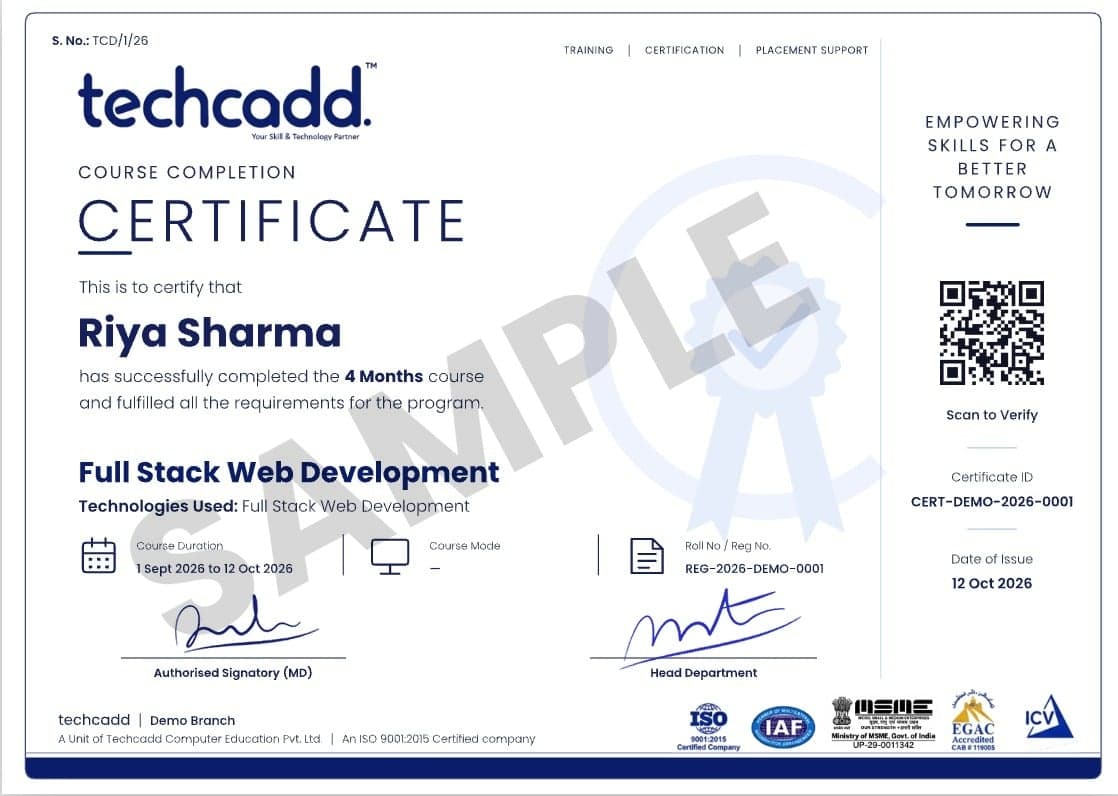
Sample TechCADD course completion certificate
Student Reviews

What Our Learners Say

  • Data Analytics finally became easy to understand.

    “I had heard about data analytics but did not know where to start. The course explained everything in simple language and showed how data can be cleaned, analyzed and presented. The practical sessions on Excel, dashboards and reporting helped me understand how analytics can support everyday business decisions.”

    Ravneet Kaur

    Business Owner · Patiala, Punjab

  • Very practical for freelancers.

    “I joined the Data Analytics course to improve my freelance skills and offer better reporting services to clients. I learned Excel, SQL, data visualization and dashboard creation. The practical assignments helped me understand how to work with datasets and turn raw information into useful insights.”

    Aman Chauhan

    Freelancer · Karnal, Haryana

  • Learned Data Analytics from home.

    “The online classes were easy to follow, and the recordings helped whenever I missed a session. I learned Excel, data cleaning, basic SQL, visualization and dashboard concepts. The trainer used practical examples, which made the technical topics much easier to understand.”

    Pooja Thakur

    Graduate (B.Com) · Dharamshala, Himachal Pradesh

  • Structured and beginner friendly.

    “I had very limited technical knowledge, so I was initially nervous about learning data analytics. The course started with the basics and gradually moved to Excel, SQL, visualization and dashboards. The practical approach has given me more confidence for interviews and data-related workplace tasks.”

    Simran Gill

    Job Switcher (from Sales) · Panchkula, Chandigarh Tricity

  • Useful for professionals in the NCR.

    “I wanted to add data analytics skills to my existing professional experience. The course covered data cleaning, analysis, visualization and reporting using practical business examples. Learning how to create meaningful reports and dashboards has helped me understand how analytics can improve everyday work.”

    Rohit Malhotra

    Working Professional (Content Executive) · Delhi

  • Now I can make better business reports.

    “I joined the course to understand how analytics could help with my online business. I learned how to organize data, analyze sales information, create charts and build simple dashboards. I am still practising, but I now feel much more comfortable working with business data.”

    Insha Mir

    Online Seller · Jammu, Jammu & Kashmir

  • Clear teaching and lots of practice.

    “The trainer explained every topic patiently and gave practical assignments after the modules. I especially liked learning Excel, SQL and dashboard creation. We worked with datasets instead of only studying theory, which helped me understand how data analytics is used in real business situations.”

    Deepak Rawat

    Postgraduate (MBA) · Uttarakhand

  • A good start after 12th.

    “I was completely new to data analytics, but the trainer started from the basics. I learned about spreadsheets, data cleaning, charts, SQL and dashboards. The practical exercises made the classes interesting and helped me understand how raw data can be converted into useful information.”

    Kritika Sharma

    12th-pass Student · Sri Ganganagar, Rajasthan

  • Worth it for working professionals.

    “I joined because I wanted to use data more effectively in my sales work. The course taught me how to analyze sales data, identify trends, create reports and build dashboards. I now feel more confident using data to support discussions and make better decisions at work.”

    Mohit Verma

    Working Professional (Sales) · Uttar Pradesh

  • Practical classroom learning worked best for me.

    “I preferred offline learning, so I attended the classes at the centre. The trainer explained everything clearly and gave us hands-on practice with Excel, SQL and visualization tools. Creating dashboards and analyzing real-world datasets was the best part of the course.”

    Harpreet Singh

    Graduate (BBA) · Ambala, Haryana

FAQs

Frequently Asked Questions: Data Analytics Course

Straight answers on eligibility, batches, certification and placements.

Still have a question?

Counsellors are available Mon – Sat: 9:00 AM – 7:00 PM.

What is a data analytics course?

A data analytics course teaches you to collect, clean, analyse and present data so businesses can make better decisions. At Techcadd, it covers Excel, SQL, statistics, Python, Power BI and Tableau, with hands-on projects.

Who is eligible for this data analytics course?

Any graduate, postgraduate, working professional, job switcher, freelancer or business owner can join, and no technical background is required. Final-year students and 12th-pass learners can also enrol if they are ready to practise regularly.

Can a complete beginner learn data analytics?

Yes, beginners can learn data analytics because the course starts from the fundamentals. You begin with Excel and basic statistics, then move step by step to SQL, visualisation tools and Python.

Do I need coding knowledge to join?

No, you do not need prior coding knowledge. SQL and Python are taught from the basics, and the early modules rely on Excel and visual tools.

What is covered in the data analytics course syllabus?

The syllabus covers data analytics foundations, advanced Excel, SQL, statistics, Python with Pandas and NumPy, Power BI and Tableau, and a capstone project. The detailed module list is in the "What You Will Learn" section above.

Which tools and software will I learn?

You will learn Excel, Google Sheets, SQL, Python (Pandas, NumPy, Matplotlib, Seaborn), Power BI, Tableau and Jupyter Notebook. These are among the tools most commonly asked for in analyst job listings.

Will I get a certificate after completing the course?

Yes, learners receive a Techcadd course completion certificate after finishing the program. Employers also look at your projects and your ability to explain your work, so the portfolio you build matters as much as the certificate.

Can I learn data analytics online, or do I have to attend offline?

You can choose either. Techcadd offers live online classes as well as offline learning at its Jalandhar centre, so you can pick what suits your schedule and location.

What jobs can I get after a data analytics course?

You can apply for roles such as Data Analyst, Business Analyst, MIS Executive, Reporting Analyst, BI Analyst and Marketing Analyst. Freelancing in dashboards and reporting is another option.

What is the salary after a data analytics course in India?

Fresher analyst salaries in India are often around ₹3 to ₹5 lakh per year, and these figures are approximate. Your pay depends on your city, company, skills in SQL, Power BI or Python, and the quality of your portfolio.

Can I do freelancing after learning data analytics?

Yes, many learners offer services such as data cleaning, Excel automation, dashboard building and monthly reporting to small businesses and online clients. Strong portfolio projects help you win your first clients.

Is data analytics a good option for working professionals?

Yes, it suits professionals in sales, finance, HR, operations and marketing because you can apply the skills in your current job or use them to move into an analyst role. Live online classes make it easier to learn alongside work.

Can students from Himachal Pradesh join the data analytics course online?

Yes, students from Himachal Pradesh can join through live online classes from places like Shimla, Solan or Dharamshala. This also suits learners who want remote jobs or freelancing without moving to a metro.

What are the data analytics job opportunities in Punjab and Haryana?

In Punjab, manufacturing, hosiery, export and IT companies in Mohali need reporting and sales analysts. In Haryana, logistics, automobile and e-commerce firms hire for operations and customer analytics roles.

Can learners from Jammu & Kashmir and Uttarakhand take this course?

Yes, learners from Jammu & Kashmir and Uttarakhand can attend live online sessions and practise on the same projects as other students. Local tourism, hospitality, handicraft and pharma businesses also use data skills, so the course helps both job seekers and business owners.

Is the data analytics course useful for students in Rajasthan and Uttar Pradesh?

Yes, the skills apply across both states. Rajasthan's tourism, jewellery and textile sectors use data for demand planning, and Uttar Pradesh's retail, electronics and IT sectors need MIS and reporting professionals.

Start Your Data Analytics Journey with Techcadd

Turn Data into Insights. Build a Career with Data Analytics at Techcadd. Learn Excel, SQL, Power BI, data visualisation and analytics through live classes and hands-on projects. Whether you are a graduate, a working professional or a freelancer, this data analytics course gives you a practical path from beginner to job-ready skills. Join online from anywhere in North India, or learn at any Techcadd centre.

  • Free 1:1 career counselling
  • Attend a live class before you enrol
  • Weekday, weekend & online batches
  • Placement support until you're hired
Prefer to talk? Call a counsellor+91 98881 22254

Book your free demo class

A counsellor will call you within 24 hours.

100% free · No spam · Your details stay private

Tell us your goal. We'll code it into reality.

A counsellor calls you back the same working day.