Skip to content

Cyber & Cloud · Beginner

Linux Course Online + Offline

Learn Linux fundamentals, command-line skills, file management, networking, permissions, administration and troubleshooting through a structured Linux Course with online and offline learning options.

  • Duration on enquiry
  • Beginner
  • Classroom + Live Online

Eligibility: Students, graduates, postgraduates, working professionals, IT learners, career changers and beginners comfortable with basic computers

4.9/5 from 750+ Google reviews

Students trained
50,000+
Google rating
4.9/5
Practical learning
80%
Hiring partners
500+
Program Overview

Linux Course

A Linux Course introduces learners to the Linux operating system, its command-line environment, file systems, user management, permissions, networking and system administration concepts. Linux is widely used across servers, cloud infrastructure, development environments, networking and many technology platforms, making it a useful technical foundation for people interested in IT careers.

The course can be useful for graduates, postgraduates, working professionals, IT learners, system-administration aspirants, career changers and beginners who want to build practical operating-system knowledge. Learners can expect to develop familiarity with Linux commands, directories, files, users, permissions, processes, networking fundamentals and basic administration tasks.

For learners in Punjab, Linux can complement broader career interests in IT services, startups, networking, cloud technologies and infrastructure. Students looking for offline learning can explore the Techcadd centre in Jalandhar, while learners from other locations can consider online learning.

The exact depth of the program, duration, certification and tools covered should be confirmed against the current course structure before enrolment.


What You Will Learn

What You Will Learn in a Linux Course

A Linux course can introduce learners to the operating system from foundational concepts through practical administration and troubleshooting.

Modules
12
Topics
99
Get the Full Syllabus PDF on WhatsApp (opens in a new tab)
  1. Module 1Linux FundamentalsLearners can begin by understanding what Linux is, how Linux-based operating systems work, the role of the kernel, distributions, users, directories, files, and the command-line environment. These fundamentals help beginners become comfortable with a Linux environment.
    • Introduction to Linux
    • Linux distributions
    • Linux file-system structure
    • Terminal and shell basics
    • Files and directories
    • Absolute and relative paths
    • Basic command-line operations
    • Command history and help
    • Working with text files
  2. Module 2Command-Line SkillsThe command line is one of the most important parts of Linux administration. Learners can develop confidence with commands used for navigating directories, creating and modifying files, searching information, and managing system resources. Understanding these commands can make routine administration and troubleshooting more efficient.
    • ls
    • cd
    • pwd
    • cp
    • mv
    • rm
    • mkdir
    • cat
    • less
    • grep
    • find
    • head
    • tail
  3. Module 3File Permissions and User ManagementLinux uses a permission system to control access to files and directories. Learners can study users, groups, ownership, permissions, and access control concepts. These concepts are particularly important for system administration and server environments.
    • User accounts
    • Groups
    • File ownership
    • Read, write, and execute permissions
    • chmod
    • chown
    • chgrp
    • Permission troubleshooting
    • Basic account administration
  4. Module 4Shell and BashLearners can explore the Linux shell and develop basic scripting knowledge using Bash. Shell scripting can help automate repetitive tasks and perform routine administrative operations. Shell scripting can later support automation and administration workflows.
    • Bash fundamentals
    • Variables
    • Conditions
    • Loops
    • Input and output
    • Pipes
    • Redirection
    • Environment variables
    • Basic shell scripts
  5. Module 5Package and Software ManagementLinux administrators frequently need to install, update, remove, and manage software packages. Learners can understand how package-management systems work and how commands differ between Linux distributions.
    • APT-based systems
    • DNF-based systems
    • Package installation
    • Software updates
    • Package removal
    • Repository concepts
    • Dependency management
  6. Module 6Processes and System ServicesLinux systems run numerous processes and background services. Understanding them helps learners monitor system behaviour and troubleshoot operational issues. These skills are useful when diagnosing service failures and understanding system performance.
    • Processes
    • Process identification
    • Process monitoring
    • Starting and stopping processes
    • Background services
    • systemctl
    • systemd
    • journalctl
    • System logs
  7. Module 7Linux NetworkingNetworking is an important part of Linux administration because many Linux systems operate as servers or network-connected infrastructure. A foundation in Linux networking can also support future learning in cloud computing, cybersecurity, and infrastructure management.
    • IP addressing concepts
    • Network interfaces
    • DNS basics
    • Connectivity testing
    • Ports and services
    • Network troubleshooting
    • ping
    • ip
    • ss
    • Basic SSH usage
  8. Module 8SSH and Remote AdministrationSecure remote access is a common requirement when working with Linux servers. Learners can understand the purpose of SSH and how remote administration works. These skills are useful for server-support and infrastructure-related roles.
    • SSH fundamentals
    • Remote login
    • Secure authentication concepts
    • Remote command execution
    • Basic SSH troubleshooting
    • Secure administration practices
  9. Module 9Backup, Archives and File ManagementLinux users often work with compressed files, archives, backups, and large directory structures. Learners can become familiar with tools such as tar and common compression workflows.
    • Creating archives
    • Extracting files
    • Compression concepts
    • Backup fundamentals
    • File searching
    • Disk-space awareness
    • Organising system files
  10. Module 10Scheduling and AutomationLinux provides tools for automating recurring tasks. Learners can understand scheduling concepts and explore utilities such as cron and crontab. Automation knowledge can become increasingly valuable as learners move towards cloud and DevOps-oriented roles.
    • Scheduled scripts
    • Routine maintenance
    • Automated file operations
    • Repeated administrative tasks
    • Basic system automation
  11. Module 11Linux Security FundamentalsLinux security begins with controlling access and understanding how systems are exposed to users and networks. Learners interested in cybersecurity can build on these Linux fundamentals with specialised security training later.
    • User and group security
    • File permissions
    • Secure remote access
    • Process awareness
    • Service management
    • Log monitoring
    • Basic system-hardening concepts
  12. Module 12Troubleshooting and Problem SolvingTechnical professionals frequently need to identify why a service, command, network connection, or application is not working correctly. Linux training can develop a systematic troubleshooting approach. This problem-solving approach is valuable across many IT support and infrastructure roles.
    • Identifying the problem
    • Checking relevant commands and outputs
    • Reviewing logs
    • Checking processes and services
    • Examining permissions
    • Testing network connectivity
    • Applying an appropriate solution
    • Verifying that the problem has been resolved
How You Learn

One simple loop, every single week

Concepts become skills only when you use them. Each week follows the same three steps.

  1. Step 1: Understand

    Short concept sessions with live demos — every idea is shown before it is practised.

  2. Step 2: Build

    Hands-on labs and a project at the end of every module, reviewed by your mentor.

  3. Step 3: Present

    Explain your work in weekly demos — the same way you will in interviews.

Tools & Technologies

Linux Tools and Technologies

Linux Tools and Technologies
AreaExamples
Linux distributionsUbuntu, Debian, Rocky Linux, AlmaLinux
ShellBash
Remote administrationSSH
Service managementsystemd, systemctl
Logsjournalctl
File managementcp, mv, find, tar
Text processinggrep, sed, awk
Permissionschmod, chown
Networkingip, ss, ping
Schedulingcron, crontab
Package managementapt, dnf
Virtualisation practiceVirtualBox or similar environments

Depending on the confirmed curriculum, learners may encounter technologies and utilities such as those above.

Who Can Do This Course

Who Can Do This Course

Linux is a versatile technical skill because it forms part of many different IT environments. Learners do not necessarily need to be experienced system administrators before starting.

  • Graduates

    Graduates from computer science, information technology, computer applications, engineering and related disciplines can use Linux to strengthen their technical foundation. Understanding Linux can complement knowledge of networking, programming, cloud computing, cybersecurity and system administration. Graduates from other academic backgrounds can also explore Linux if they are planning to transition into IT and are willing to build the necessary technical fundamentals.

  • Postgraduates

    Postgraduates who want to strengthen their infrastructure or operating-system knowledge can learn Linux as a practical technical skill. It can complement postgraduate studies in computer applications, information technology, computer science and related areas. Linux knowledge may also be useful for learners planning to move toward specialised areas such as cloud infrastructure, DevOps, cybersecurity or network administration.

  • Working Professionals

    IT professionals can use Linux training to expand their existing technical responsibilities. System support professionals, network administrators, developers, technical support staff and other technology workers may encounter Linux environments in their professional work. For working professionals, learning command-line tools and administration concepts can be particularly useful because Linux-based environments often require a different approach from graphical desktop operating systems.

  • Job Switchers

    Professionals planning to move into infrastructure, system administration, cloud or technical support roles can consider Linux as a foundational skill. Rather than treating Linux as an isolated qualification, job switchers can combine it with networking, cloud platforms, scripting or cybersecurity depending on their intended career direction.

  • Freelancers

    Linux can support certain freelance and independent technical services, particularly for people who develop deeper expertise in server configuration, website hosting environments, system maintenance or technical support. However, freelancing opportunities depend heavily on practical experience. A beginner should focus first on developing reliable technical skills rather than expecting immediate freelance work simply after completing a course.

  • Business Owners

    Business owners who manage websites, applications, internal systems or technology infrastructure can benefit from understanding Linux fundamentals. Basic knowledge can make technical discussions easier and provide better awareness of how servers and systems are managed. Business owners do not necessarily need to become Linux administrators themselves, but understanding the fundamentals can help them communicate more effectively with IT teams or service providers.

  • Career Changers

    Linux can be a useful starting point for people moving into technology from another career. It provides exposure to operating systems, command-line work, networking and troubleshooting. Career changers can later combine Linux with cloud computing, DevOps, cybersecurity or system administration to develop a more specialised profile.

  • Beginners

    Linux is suitable for beginners who are willing to practise regularly. New learners can start with basic commands and gradually move toward file management, permissions, users, processes, networking and administration. The command line can initially feel unfamiliar, but consistent hands-on practice can make Linux considerably easier to understand.

  • 12th-Pass Students

    12th-pass students interested in IT can explore Linux as an introductory technical skill. It can help them understand operating systems and command-line environments before moving into more advanced areas of IT. For long-term career development, students should combine Linux knowledge with broader education and additional technical skills.

What you need: The learning experience becomes easier when students are comfortable with basic computers and are willing to practise commands and troubleshoot problems.

Check My Eligibility
Learn from Anywhere

Learners From Across States

  • Punjab

    Students from Punjab can use Linux as a foundation for IT, networking and infrastructure-oriented careers. Learners in cities such as Jalandhar and Ludhiana can consider offline or online options depending on their schedule and location.

  • Haryana

    For learners in Haryana, Linux can complement the technical requirements of the region's IT-services, MNC, automobile, logistics and e-commerce ecosystem. Professionals can combine Linux with networking or cloud skills for a stronger infrastructure-oriented profile.

  • Himachal Pradesh

    Students from Himachal Pradesh can use online learning to develop Linux skills without needing to travel regularly for specialised training. This can be particularly useful for learners exploring remote IT work or planning a transition into technical careers.

  • Chandigarh

    Linux can complement the technology skills of students and professionals in Chandigarh's IT, BPO, education and startup environment. Learners can study Linux alongside networking, programming or cybersecurity depending on their career goals.

  • Delhi NCR

    Delhi NCR provides a large technology and corporate ecosystem where Linux knowledge can complement careers involving IT infrastructure, cloud technologies, software development and technical support. Learners in Delhi, Noida and Ghaziabad can use online learning when flexibility is important.

  • Jammu & Kashmir

    Students from Jammu and Srinagar can access Linux learning online and build a technical foundation without depending on a specialised physical training centre nearby. Linux can later be combined with networking, cloud or cybersecurity skills.

  • Uttarakhand

    Learners from Dehradun and Haridwar can use Linux training to develop infrastructure-oriented technical knowledge alongside their education or employment. Online learning can be particularly useful for professionals who need flexibility.

  • Rajasthan

    For students in Jaipur and other parts of Rajasthan, Linux can serve as a practical foundation for broader IT learning. Learners can combine Linux with programming, networking or cloud computing depending on their career direction.

  • Uttar Pradesh

    Students from Noida, Lucknow, Meerut and other parts of Uttar Pradesh can use Linux knowledge as part of an IT career pathway. In technology-oriented markets such as Noida, Linux can complement skills related to cloud infrastructure, development and technical operations.

Careers

Career Opportunities After Learning Linux

Linux knowledge can support several technical career directions, particularly when combined with additional practical skills.

  • Linux Administrator
  • System Administrator
  • IT Support Engineer
  • Technical Support Engineer
  • Infrastructure Support Executive
  • Network Support Professional
  • Cloud Support Associate
  • Junior Cloud Operations Professional
  • DevOps-oriented Technical Roles
  • Cybersecurity Support Roles

Linux should not be viewed as a guarantee of employment or a particular salary. Career outcomes depend on practical ability, experience, additional technologies, communication skills, location, employer requirements, and the learner's broader technical profile.

  • Future Scope of Linux Skills

    Linux remains relevant because it forms part of many modern computing environments. Learners who develop a strong Linux foundation can continue towards areas such as Linux → System Administration → Cloud → Automation → DevOps, or Linux → Networking → Infrastructure → Cybersecurity, or Linux → Servers → Containers → Cloud Operations. This makes Linux a useful starting point for learners who want to build a long-term technical career rather than learn only one isolated software tool.

  • Opportunities Across North India

    For learners across Punjab, Haryana, Himachal Pradesh, Chandigarh, Delhi NCR, Jammu & Kashmir, Uttarakhand, Rajasthan, and Uttar Pradesh, Linux skills can complement local opportunities in IT services, infrastructure support, cloud operations, technical support, software companies, and technology-driven organisations. The specific availability of roles varies by city, employer, experience level, and additional technical skills.

Your Mentor

Learn from people who do the work

Every batch is led by a senior mentor and supported by teaching assistants, so doubts are cleared the same day.

Vikram Rana

Cybersecurity & Cloud Mentor

Former network security engineer who has secured infrastructure for banks and IT firms. Runs every class as a lab — students attack, defend and deploy real systems.

  • Ethical hacking
  • Network security
  • AWS & Azure
  • Linux
  • DevOps
Industry experience
12+ years
Students mentored
1,800+
Doubt support
Same day
Why This Program

Why This Program

  1. Linux Is a Strong Technical Foundation

    Understanding an operating system is fundamental to many IT roles. Linux gives learners exposure to files, processes, users, permissions, networking and command-line operations, creating a useful foundation for more specialised technologies.

  2. Develop Command-Line Skills

    One of the most valuable aspects of Linux learning is becoming comfortable with the command line. Learners can practise commands for navigating directories, managing files, viewing system information and performing administrative tasks. Command-line confidence can also make it easier to work with remote systems and technical environments.

  3. Understand System Administration

    Linux training can introduce learners to the basic responsibilities involved in managing a Linux system. These can include user administration, permissions, processes, storage, services and system configuration. This knowledge can form a foundation for further study in Linux administration.

  4. Build Networking Understanding

    Linux and networking frequently overlap in professional IT environments. Learning concepts such as IP configuration, network interfaces, connectivity and basic network troubleshooting can help learners understand how systems communicate. This can be particularly useful for students planning to move toward networking, cloud or cybersecurity.

  5. Prepare for Cloud and DevOps Learning

    Linux knowledge is highly relevant to many cloud and DevOps learning paths because learners frequently encounter Linux-based environments when working with servers, applications and infrastructure. A learner who understands Linux fundamentals can therefore have a stronger foundation when progressing toward cloud platforms, containers, automation or DevOps.

  6. Useful for Cybersecurity Learning

    Linux is also relevant to cybersecurity because security professionals frequently interact with command-line environments, servers, network tools and system configurations. However, Linux alone does not make someone a cybersecurity professional. Learners should combine it with networking, security concepts, scripting and practical security knowledge.

  7. Develop Troubleshooting Skills

    Linux encourages learners to understand what is happening inside a system rather than relying entirely on graphical interfaces. Troubleshooting can involve examining processes, permissions, configurations, logs and network connectivity. This analytical approach can transfer to many technical support and infrastructure roles.

  8. Relevant Career Directions

    Linux skills can support several technology career paths, depending on the learner's additional knowledge and experience. Possible directions include:

    • Linux Administrator
    • System Administrator
    • Technical Support Engineer
    • IT Support Professional
    • Network Support Professional
    • Cloud Support / Infrastructure Roles
    • DevOps-oriented roles
    • Cybersecurity-related roles

    Actual job requirements vary by organisation, so learners should develop supporting skills alongside Linux.

  9. Useful for Career Switching

    For someone moving from a non-technical career into IT, Linux can provide a practical introduction to operating systems and infrastructure. It can become the starting point for a broader roadmap involving networking, cloud computing, cybersecurity or DevOps.

  10. Supports Portfolio and Practical Projects

    Linux learning can be reinforced through practical exercises and projects. Examples may include setting up users and permissions, configuring services, managing files, troubleshooting system issues or creating a small Linux-based environment. Documenting such projects can help learners demonstrate practical understanding when building a technical portfolio.

  11. Suitable for Continued Skill Development

    Linux is not a skill that needs to end with one course. Learners can progressively move from basic commands to administration, shell scripting, networking, server management, cloud infrastructure and automation. This makes Linux particularly useful as a long-term technical foundation rather than simply a standalone course topic.

  12. Flexible for Different Career Goals

    The same Linux foundation can be applied differently depending on the learner's objective. A developer may use it to understand development environments, a network professional may focus on system connectivity, a cloud learner may move toward server infrastructure, while a cybersecurity learner may concentrate on command-line and system-security concepts. For this reason, Linux can be valuable for both beginners and experienced IT professionals who want to strengthen their understanding of operating-system environments.

Why Choose techcadd

Why Choose Techcadd for Linux Training?

  1. A Modern Learning Environment for Technology Skills

    Techcadd is positioned within a modern technology-learning environment, including the “North India's first AI-powered and Robotics learning centre”. For Linux learners, this broader technology environment can help connect operating-system knowledge with practical areas such as automation, infrastructure, computing systems, cloud technologies, and emerging technical applications.

  2. Practical Understanding of Linux Concepts

    Linux is best learned by working with the operating system rather than only memorising commands. A structured Linux course can help learners understand the command line, directories, permissions, users, processes, networking concepts, software installation, and system troubleshooting. This practical approach can make technical concepts easier to understand and apply in real work situations.

  3. Suitable for Beginners and IT Learners

    Linux can initially appear complex because of its command-line interface and technical terminology. A structured learning path can make the subject more approachable by progressing from basic commands and file management to administration, networking, security, and troubleshooting concepts. This makes Linux relevant for beginners as well as learners who already have some IT knowledge.

  4. Useful Foundation for Multiple IT Career Paths

    Linux skills are relevant across several areas of IT. Depending on a learner's interests and additional skills, Linux knowledge can support career directions such as system administration, technical support, infrastructure support, cloud operations, networking, cybersecurity, and DevOps-oriented work. Learning Linux therefore provides a technical foundation that can be extended into different specialisations.

  5. Learning That Supports Career Switching

    Professionals looking to move into IT may use Linux as one part of their technical upskilling journey. Learning command-line operations, system configuration, troubleshooting, networking fundamentals, and basic administration can help career changers develop a stronger understanding of how computing infrastructure works.

  6. Flexible Learning for Different Locations

    The Linux learning pathway can be relevant to students and professionals across Punjab and other North Indian regions. Learners who prefer classroom learning can explore the Techcadd centre in Jalandhar, Punjab, while online learning can provide flexibility for learners located in other cities and states.

  7. A Strong Base for Further Technical Learning

    Linux knowledge can become a foundation for advanced areas such as cloud computing, containerisation, automation, server administration, cybersecurity, and DevOps. Learners can continue developing their skills after understanding the Linux fundamentals, depending on their career goals and the technologies they want to specialise in.

  8. Focus on Transferable Technical Skills

    Linux training can develop practical habits that are useful beyond one operating system or one job role. Working with the command line, understanding permissions, reading system logs, troubleshooting problems, managing users, and interpreting network information can strengthen a learner's overall technical problem-solving ability.

Duration, Mode & Batches

Choose the track that fits you

Learn Linux as a certificate course, as university industrial training, or as a longer job-ready diploma.

Compare learning tracks for the Linux Course
FeatureCertificate CourseIndustrial TrainingMost chosenJob-Ready Diploma
Typical durationDuration on enquiry6 weeks – 6 months9 – 12 months
Full course curriculumIncludedIncludedIncluded
Module projectsIncludedIncludedIncluded
Live industry projectNot includedIncludedIncluded
University training report & letterNot includedIncludedIncluded
Advanced specialisation modulesNot includedNot includedIncluded
Placement assistanceIncludedIncludedIncluded
Internship with experience letterNot includedNot includedIncluded

Batch timings

  • Weekday Morning

    Mon – Fri · 9:00 – 11:00 AM

    Classroom
  • Weekday Evening

    Mon – Fri · 5:00 – 7:00 PM

    Classroom
  • Weekend

    Sat – Sun · 10:00 AM – 1:00 PM

    Classroom + Live
  • Live Online

    Mon – Fri · 8:00 – 9:30 PM

    Live online

Not sure which track or batch suits you? A counsellor will help you decide.Ask a Counsellor

Certification & Placement

Finish with proof employers can verify

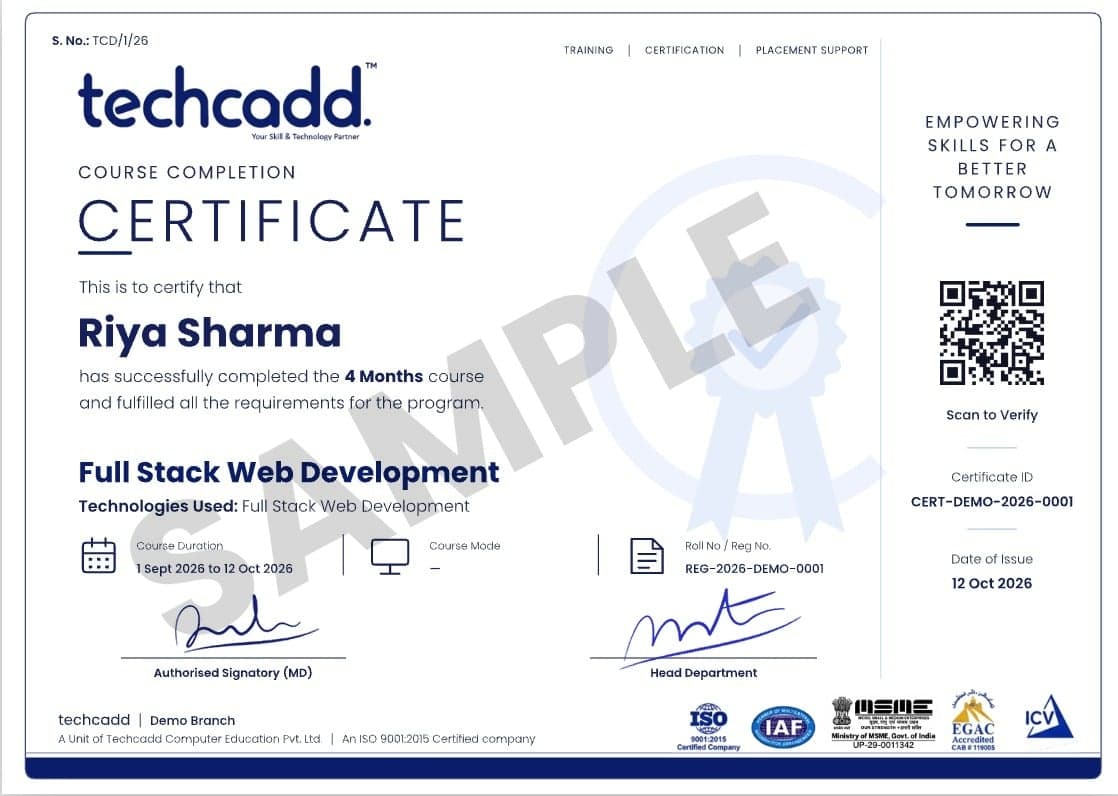
Your certificate lists your modules and projects, and our placement team works with you until you land the role.

  • Verifiable online with a unique certificate ID
  • Lists your modules, projects and grade
  • Accepted for university industrial training credit
  • Add to LinkedIn in one click
Sample TechCADD course completion certificate
Student Reviews

Heard from our alumni

Rated 4.9/5 by 750+ students on Google.

  • “The MERN course was completely project-based. By the end I had 5 live projects in my portfolio and got placed at a Mohali IT company within a month.”

    Harpreet Kaur

    Frontend Developer · Jalandhar

  • “Mentors explained every concept with real business data. The Power BI dashboards I built during training were exactly what my interviewer asked about.”

    Arjun Sharma

    Data Analyst · Ludhiana

  • “Hands-on labs for ethical hacking were amazing. The faculty helped me prepare for certifications and interviews step by step.”

    Simranjeet Singh

    Cybersecurity Intern · Amritsar

  • “I joined after 12th with zero knowledge. Now I run ad campaigns for three clients. The AI marketing tools module was a game-changer.”

    Neha Thakur

    Digital Marketer · Hoshiarpur

  • “My 6-month industrial training was the best decision of my degree. Real projects, proper guidance and a strong certificate for my university.”

    Rohit Verma

    B.Tech Industrial Trainee · Phagwara

  • “The design course pushed me to build a real portfolio. Weekly feedback sessions made a huge difference to my confidence.”

    Ananya Gupta

    UI/UX Designer · Chandigarh

FAQs

Frequently Asked Questions About Linux Course

Straight answers on eligibility, batches, certification and placements.

Still have a question?

Counsellors are available Mon – Sat: 9:00 AM – 7:00 PM.

What is a Linux course?

A Linux course teaches learners how to work with the Linux operating system and its command-line environment. Depending on the curriculum, it can cover Linux fundamentals, file management, permissions, users and groups, processes, networking, services, shell commands, troubleshooting, and basic administration.

Is a Linux course suitable for beginners?

Yes. Beginners can start with fundamental concepts such as navigating directories, creating and managing files, using basic commands, understanding permissions, and working with the terminal. More advanced administration and networking concepts can be introduced progressively.

Who can learn Linux?

Linux can be learned by students, graduates, postgraduates, working professionals, IT learners, career changers, technical support aspirants, and people interested in system administration, cloud, networking, cybersecurity, or DevOps-oriented career paths.

Do I need programming knowledge to learn Linux?

Advanced programming knowledge is not required to begin learning Linux. Basic command-line skills can be developed independently. Learners can later explore Bash scripting and programming concepts if their career goals require automation or software development.

What topics are covered in Linux training?

A Linux learning program may cover Linux fundamentals, terminal commands, file systems, users and groups, permissions, package management, processes, services, system logs, networking, SSH, shell scripting, scheduling, troubleshooting, and security fundamentals. The exact syllabus should be confirmed with the institute.

Which Linux commands should beginners learn?

Common beginner commands include pwd, ls, cd, mkdir, cp, mv, rm, cat, less, grep, and find. As learners progress, commands and utilities related to permissions, processes, networking, services, and system administration can also be introduced.

Is Linux useful for system administration?

Yes. Linux is highly relevant to system administration because administrators may need to manage users, permissions, files, processes, services, packages, logs, networking, and remote systems. Linux training can provide a foundation for developing these skills.

Can Linux skills help with cloud computing?

Linux can provide a useful foundation for cloud computing because many cloud environments involve Linux-based systems and server administration. Learners can build on Linux knowledge by studying cloud platforms, networking, automation, containers, and infrastructure concepts.

Is Linux useful for cybersecurity?

Linux knowledge can support cybersecurity learning by helping students understand operating systems, permissions, processes, networking, logs, services, and command-line environments. However, Linux training alone is not equivalent to specialised cybersecurity training.

Can Linux help me move towards DevOps?

Yes. Linux is commonly used as a foundation for learning areas associated with DevOps, including command-line administration, scripting, automation, networking, servers, containers, and cloud infrastructure. Additional DevOps technologies and practices should be learned separately as part of an advanced pathway.

What career options are available after learning Linux?

Depending on experience and additional skills, Linux knowledge can support career directions such as Linux Administrator, System Administrator, IT Support Engineer, Technical Support Engineer, Infrastructure Support, Cloud Support, Network Support, and DevOps-oriented technical roles.

Is Linux difficult to learn?

Linux may initially feel unfamiliar because of its command-line interface. With structured learning and regular practice, beginners can gradually become comfortable with commands, files, permissions, processes, networking, and troubleshooting.

Can I learn Linux online?

Yes. Linux can be learned online because much of the practical work involves working with operating systems, terminals, commands, virtual environments, and remote systems. Online learning can be particularly useful for students and professionals who need flexible schedules.

Can I learn Linux offline in Jalandhar?

Learners interested in classroom-based learning can explore Linux training at the Techcadd centre in Jalandhar, Punjab. The exact classroom schedule, availability, fees, and curriculum should be confirmed directly with the centre.

Is Linux useful for students in Punjab?

Yes. Linux can be a useful technical foundation for students interested in IT support, system administration, networking, cloud computing, cybersecurity, infrastructure, and DevOps-oriented career paths.

Can students from Haryana learn Linux?

Yes. Students and professionals from Haryana can learn Linux through an appropriate online learning pathway or explore available classroom options in Jalandhar. Linux skills can complement broader IT, infrastructure, cloud, and technical-support learning.

Is Linux useful for learners from Himachal Pradesh?

Linux can be useful for learners from Himachal Pradesh who want to build technical skills without limiting themselves to a single IT specialisation. The knowledge can support further learning in system administration, networking, cloud, and cybersecurity.

Can Chandigarh students learn Linux online?

Yes. Online Linux learning can allow Chandigarh-based students and professionals to study Linux without needing to travel regularly. Learners can develop command-line, administration, networking, and troubleshooting skills remotely.

Is Linux training useful for Delhi NCR IT careers?

Linux can complement several technical career pathways relevant to Delhi NCR, including system administration, infrastructure support, cloud operations, technical support, and DevOps-oriented roles. Career outcomes depend on experience and additional skills.

Can learners from Uttar Pradesh study Linux?

Yes. Learners from Uttar Pradesh can use online learning to build Linux skills and later combine them with areas such as cloud computing, networking, cybersecurity, automation, or DevOps according to their career objectives.

What is the career scope of Linux in India?

Linux can support multiple IT career pathways because operating-system knowledge is useful in administration, infrastructure, servers, networking, cloud environments, automation, cybersecurity, and DevOps. The strongest career opportunities generally require Linux skills to be combined with other relevant technologies and practical experience.

Does learning Linux guarantee a job?

No. Completing a Linux course does not guarantee employment or a specific salary. Career outcomes depend on practical skills, projects, experience, communication abilities, additional technical knowledge, employer requirements, and the local job market.

What should I learn after Linux?

The next learning path depends on your career goal. System administration learners can explore advanced server management; cloud aspirants can study cloud platforms; DevOps learners can move towards automation and containers; cybersecurity learners can build networking and security expertise.

How should I practise Linux?

Regular hands-on practice is important. Learners can work with a Linux installation or suitable virtual environment, practise command-line operations, create users and permissions, manage files, inspect processes and logs, test networking commands, and gradually build small administration exercises.

Is Linux certification necessary for a Linux career?

A certification may be useful in some career situations, but it is not the only factor employers consider. Practical Linux knowledge, troubleshooting ability, relevant experience, projects, communication skills, and additional technical skills can also be important.

What is the difference between Linux and Linux administration?

Linux refers broadly to the operating-system ecosystem and technologies built around the Linux kernel. Linux administration focuses more specifically on managing Linux systems, including users, permissions, services, packages, processes, networking, security, logs, and troubleshooting.

Can non-IT students learn Linux?

Yes. Non-IT learners can begin with Linux fundamentals if they are comfortable learning basic computer and technical concepts. A gradual learning approach can help them develop the command-line and system concepts required for more advanced topics.

What skills are important along with Linux?

Depending on the career goal, useful complementary skills may include networking, cloud computing, Bash scripting, Git, automation, containers, cybersecurity fundamentals, databases, or DevOps practices. Learners should choose additional skills based on the role they want to pursue.

How long does it take to learn Linux?

The time required depends on the learner's previous technical knowledge, the depth of the curriculum, and the amount of regular practice. Basic Linux commands can be learned relatively quickly, while administration, networking, troubleshooting, scripting, and advanced infrastructure skills require continued practice.

What are the benefits of learning Linux?

Linux can develop command-line confidence, operating-system knowledge, troubleshooting ability, administration skills, networking awareness, and a foundation for further learning in cloud computing, cybersecurity, automation, and DevOps. It can therefore be a useful technical skill for a variety of IT career paths.

Build Your Linux Skills for a Stronger IT Career

Linux is a valuable technical foundation for learners interested in system administration, IT support, networking, cloud computing, cybersecurity, infrastructure, automation, and DevOps-oriented career paths. Whether you are a beginner starting your IT journey or an existing professional looking to strengthen your technical skills, a structured Linux learning program can help you develop practical knowledge of command-line operations, file management, permissions, users, processes, services, networking, SSH, troubleshooting, and system administration.

  • Free 1:1 career counselling
  • Attend a live class before you enrol
  • Weekday, weekend & online batches
  • Placement support until you're hired
Prefer to talk? Call a counsellor+91 98881 22254

Book your free demo class

A counsellor will call you within 24 hours.

100% free · No spam · Your details stay private

Tell us your goal. We'll code it into reality.

A counsellor calls you back the same working day.